WPMU permissions hack for new users

If you are using or administrating WordPress Multi-User you may have come across the following error message for new users creating just a login name (not getting blog):

You do not have sufficient permissions to access this page.

This problem can get pretty frustrating if you are using a single blog on WPMU that has several users. For example, I created one blog for my class this Summer that has six additional users. Each of the students created a login name without a problem, but when they tried to sign on to the site (and I had given them all editing permissions) they received the above message. This can be worked around clunkily with a couple of hard refreshes and a handy edit button on a post, but there is a better hack.

On the WPMU forums I found the following solution. According to this thread, and others like it, this is a more general issue with WPMU 1.0 and hasn’t really been addressed as of yet. However, as is often the case with open source applications, someone has come up with a quick hack that has worked perfectly for me thus far. Below is the code for the plugin to make this problem go away.
<?php
/*
Plugin Name: ADRX No Caps User Login
Plugin URI:
Description: This plugin determines what happens when a user logins in at a blog for which s/he has no capabilites.
*/
function adrx_nocaps_login() {
global $current_site, $current_blog, $current_user, $user_ID, $wpdb;
if (!is_blog_user() || !is_site_admin) { // no caps and not site admin
if ($current_blog->domain==$current_site->domain) { // logged in at main site — no caps
// if user has blog, send user there - code copied from menu.php
$primary_blog = $wpdb->get_var( “SELECT meta_value FROM {$wpdb->usermeta} WHERE user_id = ‘$user_ID’ AND meta_key = ‘primary_blog’” );
if( $primary_blog ) {
$newblog = $wpdb->get_row( “SELECT * FROM {$wpdb->blogs} WHERE blog_id = ‘{$primary_blog}’” );
if( $newblog != null ) {
header( “Location: http://” . $newblog->domain . $newblog->path . “wp-admin/” );
exit;
}
}
}
// user has no caps here
// user either has no existing primary blog of his/her own or did not log in at main site
// redirect to front page of the blog at which s/he logged in
header( “Location: http://” . $current_blog->domain. “/” );
exit;
}
}
add_action(’admin_menu’, ‘adrx_nocaps_login’);
?>

Just copy the above code into a text editor, save it as adrx.php, and copy it into the mu-plugins folder of your WPMU install. That’s it! Hopefully this will be solved in the next version, for it is a pretty big problem if you are going to have a multi-user blog within this environment.

Original post by jimgroom

WordPress: power and simplicity

Subtitle: Are we ready to take WordPress as a CMS seriously yet?

Power Lines

This is a post that was inspired by both a question on OLDaily as well as a post about Drupal documentation on Half an Hour. I originally threw out a flippant response to the “Joomla or Drupal?” question in regards to open source content management systems, that was appropriately handed right back to me. This, along with a recent momentous event, further encouraged me to sit down and spend some time framing a series of thoughts about WordPress (bordering on a misguided passion at this point) I have been raving about for well over a year now.

The common criticisms I hear about WordPress are that while cute for blogging, it can’t do much in terms of sophisticated Content Management and more granular permissions. Let’s take a moment here and think about these two “shortcomings” in relationship to how many of the best minds in ed tech have begun to conceptualize distributed learning networks in terms of more personalized spaces. In turn, these ““Personal Learning Environments,” “Virtual learning Environments,” and/or “Virtual Learning Spaces” (the terminology is still uncertain and in flux but all share a common core of an online space where users can shape their learnings through content creation, links, aggregation, integration with 3rd party online services, etc. -see recent discussions here, here, and here) while being in a direct relationship with others that feed out into the various services and designated spaces while also quickly and easily ingesting, feeding out, and represent information to reflect the goings on of a distributed learning network -and hopefully with some intelligent filtering, variegated coupling, and visually pleasing re-presentations. Stephen Downes says it better:

Very similar to EduRSS in concept design is the student version of the same idea, generally known as the Personal learning Environment. The PLE differs from EduRSS in that it depends explicitly on external services (such as Flickr, del.iciop.us, Blogger and the like) for data retrieval and storage. The ‘node in the network’, with the PLE, is actually virtual, distributed over a number of websites, and also very portable (ideally, it could be implemented on a memory stick).

Now the point has been, and should remain, that and individual within a given network should be able use the numerous tools she prefers and “they” (they! who in the hell is ‘they‘?) should find ways to aggregate, filter, and reflect relationships through topics using RSS, RDF, category tags, etc. (also known in certain abject circles as EDUGLU!).

Given this as a basis to move within and from (while at the same time acknowledging that web authoring tools may once again radically change or become interchangeable some time soon) -why are so many folks so quick to discount, or fail to even consider, WordPress as an ideal content management system for the more distributed learning networks that have been on so many people’s minds as of late? Why is a more simplistic blogging platform with an insane user and development community an ideal CMS for distributed learning networks? Well, it’s ideal in a few senses within some very specific contexts, let me try and be both specific and clear.
(more…)

Original post by jimgroom

Exploring a few WPMU plugins

I recently got inspired, so I returned to the ELS blogs site to see what was going on in the world of WordPress Multi-User plugins (as well as to test Simple Pie on WPMU -which works beautifully!). I’m glad I did!

I found a few cool new plugins for WPMU, and I will order them in the order of overall coolness (the coolest comes first). All of these plugins can be downloaded on the WPMU development site here.

  • The Anarchy Media Player Plugin (love the name!): WPMU now has an all-in-one multi-media player thanks to the Anarchy Media Plugin. Stop and think about this for a moment, WP has another plugin as versatile and well designed as PodPress. That’s two bad ass multi-media plugins while Drupal is still trying to put one half-way decent module together -what’s wrong here?
    Here are the file formats and online services this plugin supports:

    Simple href links: Upload your mp3, flv, mov, mp4, m4v, m4a, m4b, 3gp, wmv, avi or asf file via the WordPress editor’s upload browser then “send to editor” – or make a hypertext link to any external file on the web – and you’re done!

    Rich text editor: Flash swf (including Google Video, YouTube etc., players via the “A” for anarchy button) or Director dcr use the respective rich editor buttons. To embed the various media players supported by AMP enter the full HTTP address (url) to your YouTube, Google Video, iFilm, Revver, Metacafe, MySpace or GoEar web page. For DailyMotion video and Apple iTunes iMixes just copy and paste the code from their embeddable players.

    A very cool development to say the least!

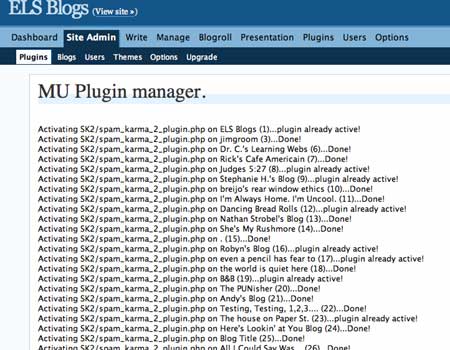
  • The WPMU Plugin Manager: A close number two if you have anything at all to do with administering a WPMU install. This plugin rocks! Here’s the official copy: “Manage global plugin policies or just turn on and off plugins for individual blogs – without enabing like the plugin backend menu.” I can’t begin to stress how amazing this is for customizing users on a case-by-case, or class-by-class, basis. I just installed it and updated all the blogs on the site with Spam Karma 2 -won’t they love me without ever knowing why! Here’s a looksie:MU Plugin Manager
  • WPMU Recent Posts: “Adds a sidebar widget to let you display recent posts from updated blogs in WordPressMU. The posts from blogs marked as spam, mature, or deleted will not be listed. Download from the topmost link .” Relatively straightforward -but always useful to catch a quick glimpse of what’s most recent on the home page. It supposedly creates a sidebar widget, but I couldn’t get that to work too well, I had to copy and paste a php snippet in the sidebar widgets. So, not too well coded, but easy enough to work around with a slick K2 sidbar modules them:)
  • Mass Mailer: A straightforward plugin (works better than the previous plugin out of the box, but since it has to do with e-mail I had to rank it down a peg) that allows the administrator to e-mail everyone who has a blog on the site. This will be useful, for example, if I want to send a link to a post about exporting their content as they are getting ready to graduate, or details about new plugins, etc. I imagine I won’t use it much, but a nice fiver in my pocket regardless.
  • WPMU Latex Math & Random Blog: These two plugins tie for last because neither worked correctly for me. The Random blog plugin is a nice idea (have a link on the portal that features a random blog in the network) but it was terribly coded and continually chokes on the headers. I’m gonna have to re-visit this one. WPMU Latex is a bummer because I know it works (I saw it on uniblogs.org), so I am going to have to revisit it sometime soon as well. I just love the idea of folks putting complex mathematical equations into a blog or wiki (MediaWiki is Latex ready but I have seldom seen it used) -so I will have to do more research on this one.
  • I do love playing with WordPress Multi-User -I guess I am a WordPress fan boy:)

    Original post by jimgroom